My Home Lab Infrastructure
A two-node Proxmox cluster running 20+ containers and VMs — covering low-code automation with n8n, local AI with Ollama, SSO with Authentik, self-hosted docs with Outline, and all the networking, backups, and monitoring that keeps it running.
Homelab overview
The diagram reflects the live layout: Cloudflare sits at the edge (DNS/CDN), traffic comes in via Cloudflare Tunnel to Nginx Proxy Manager (reverse proxy / TLS), and OPNsense enforces segmentation between VLANs. WireGuard provides remote access, and AdGuard Home handles DNS on the LAN.
Domain: *.balawalraja.uk (Cloudflare). Stack: Proxmox VE, LXC/Docker, OPNsense, Cloudflare Tunnel, NPM.
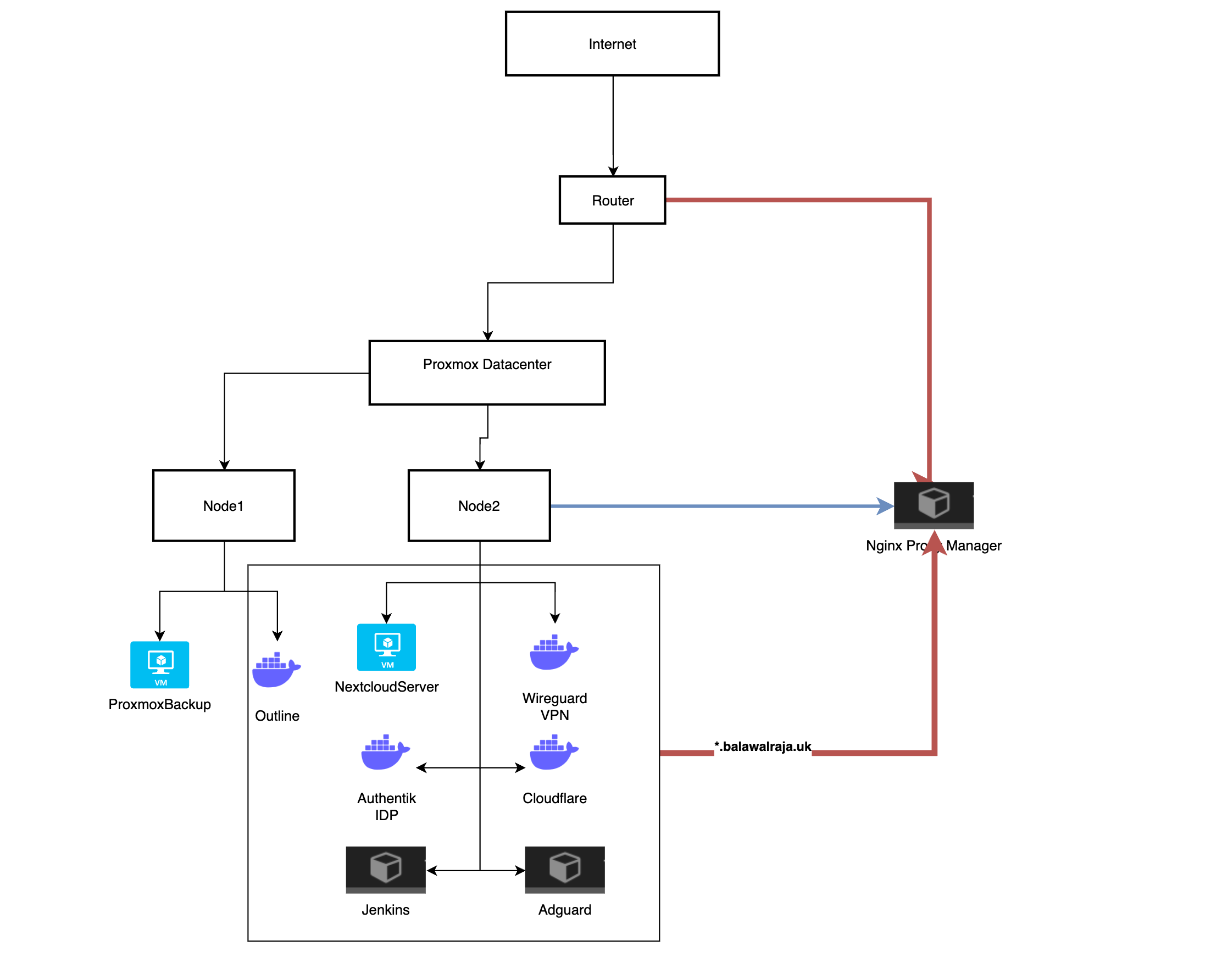
Infrastructure overview
Proxmox platform
A two-node Proxmox VE cluster with 20+ containers/VMs, a mix of LXC and Docker workloads, and redundancy where it matters.
- Node 1: core services & automation
- Node 2: edge/ingress & networking
- Backups: Proxmox Backup Server + local storage, with optional external/NAS archive
Ingress & access
Public HTTPS, VPN, and LAN paths align with the diagram’s legend (public, VPN tunnel, LAN, management).
- Web: Cloudflare edge + Tunnel to NPM (reverse proxy / TLS to services)
- VPN: WireGuard for remote client devices
- LAN: Router/firewall to Proxmox, PCs, IoT, and NAS
- DNS: AdGuard Home for filtering and internal resolution
Proxmox cluster layout
I keep the lab simple: edge ingress is separated from core services, and the AI/testing areas are isolated behind OPNsense VLAN policies.
Node 1
Core services, automation, docs, monitoring, and backups.
Node 2
Ingress, DNS, VPN, and connectivity between VLANs.
Networking & ingress
Operations
Security & access control
High-level security notes: public access is fronted by Cloudflare, traffic enters via a tunnel to Nginx Proxy Manager, and internal access is segmented behind OPNsense. SSO is handled with Authentik; backups run through Proxmox Backup Server.
Cloudflare & NPM
Cloudflare for DNS, CDN, and edge controls; tunnel delivers traffic to NPM, which reverse-proxies and handles TLS for internal services
Authentik SSO
Identity provider for single sign-on across internal applications
WireGuard VPN
Encrypted remote access for clients without exposing management to the public internet
AdGuard Home
DNS filtering and policy on the LAN, aligned with the diagram’s access path
CrowdSec
Collaborative threat detection engine — analyses logs, detects attack patterns (HTTP probing, brute force), and issues live bans via the bouncer
Storage, backup & disaster recovery
What the diagram encodes
- Proxmox Backup Server: Centralized backups with deduplication and incremental runs
- Local storage (LVM): VM and container disks on-node
- External / NAS (optional): Media and long-term archive off the cluster
- Scheduling: Automated PBS jobs (e.g. nightly) plus periodic restore checks
- Integrity: Verification and test restores to validate recoverability
Technical Challenges & Solutions
Challenges Overcome
The practical problems solved to get a stable, secure, and maintainable lab.
- Keeping the edge (ingress) separated from core services
- Segmenting VLANs safely without breaking “home” usability
- Running local AI workloads without impacting everything else
- Backups that are fast to run and easy to restore
Solutions Implemented
The changes that made the environment reliable, repeatable, and easy to operate.
- Cloudflare Tunnel + NPM for secure HTTPS ingress
- OPNsense VLAN segmentation with default-deny where appropriate
- Authentik SSO to keep access consistent
- Proxmox Backup Server with scheduled jobs and regular restore checks
Learning Outcome: This hands-on experience, combined with professional cloud infrastructure work at ZAVA, has strengthened my skills in system administration, network management, infrastructure automation, and secure operations.